
General Information
Welcome to the Sponsor Guide for Open Source Summit India (OSS) 2026! OSS India 2026 is taking place in-person on Tuesday, 16 June – Wednesday, 17 June in Mumbai. This is your one-stop resource for all sponsorship deliverables and exhibit-related needs. Please read through the guide carefully and let us know if you have any questions or need assistance.
Sponsor Lead
Courtenay Pope and Kate Qiu will be your main points of contact for sponsorship deliverables for this event.
For CFP, Keynote, and speaker questions, please reach out to Shannon Jessee.
CONFERENCE SCHEDULE
Please review the full conference schedule, including keynote, sessions, co-located events, social events, and other activities. Log into the schedule app to build your personal agenda. The schedule is subject to change and session seating is available on a first-come, first-served basis.
Sponsor Marketing Kit
Looking for resources to help you promote your presence at Open Source Summit India 2026? Please view the Sponsor Marketing Kit for sample social media posts and graphics for download.
Registration
Registration Codes
Sponsors receive (2) different types of registration codes. Review the code types below:
- Complimentary Sponsor Code:
- You receive a number of complimentary passes based on your sponsorship level. This code and usage amounts was emailed to you. If you need your code resent, please contact Courtenay Pope and Kate Qiu.
- All sponsors should register with the ‘Sponsor’ type when completing the registration process.
- 20% Discount Code: OSSIN26DISC20
- This discount code can be applied to any additional corporate passes that you wish to purchase. It will reduce the prevailing registration rate by 20% and can be used an unlimited number of times.
Note: Do not share the discount code publicly, e.g. on your website or on social media
Note: These codes are for Open Source Summit India 2026 only. Additional registration is required if you plan to attend any co-located events.
How to Register
- To register with any of the above sponsor codes, please go to: https://events.linuxfoundation.org/open-source-summit-india/register/
- Click on the button “Register Now”.
- Log in with your LFID (see important notes below).
- Once logged in with your LFID, choose to register yourself or someone else.
- Select your Registration Type:
- Select “Sponsor” if you are registering for your company and booth staff
- Select “Corporate” if you are using the 20% discount code
- Continue to fill out the registration form.
- Once you have applied your discount code, enter your payment information (if applicable) and complete your registration immediately. Do not abandon your registration once you have entered the discount code. The code will expire if the registration is not completed.
- You will receive a confirmation email once your registration is completed. Should you need to cancel or modify your registration at a later time, please use the link and confirmation number provided in your confirmation email.
Bulk Pass Purchases
Deadline to request: 6 May
Before requesting to pay for event registrations by invoice, a process which can take 3-4 weeks, please note that it is faster, more efficient, and preferred to register and pay directly through our official registration platform, Cvent. Cvent offers self-service credit card payment, flexible ticket substitutions, transfers, and cancellations when things change, and group registration options. If you’re looking to pay for a group using a single credit card but would like the group members to register individually on their own, the Registration Team at [email protected] can assist with setting up this payment option directly in Cvent. This payment option does not require an official invoice request.
If you would like to proceed with requesting an invoice for event registrations, please review our Invoice Policy and Submit Your Invoice Request.
After we have received payment confirmation on our end, we will provide a discount code for your registrant(s) to use in the Cvent registration platform to complete their registration. We are unable to issue codes until payment has been confirmed by our finance team.
No Badge Swapping or Sharing
All participants must be individually registered and possess a valid event pass. Badges are strictly non-transferable and may only be used by the individual to whom they are issued, regardless of the length of attendance. No exceptions will be made.
Any instance of badge sharing discovered during the event will result in an additional registration fee charged at the standard registration rate. Furthermore, individuals involved in badge sharing may be removed from the event at the discretion of event management.
Important Notes
Linux Foundation ID (LFID): Our registration system is integrated with the Linux Foundation ID system (LFID). At the beginning of the registration process, you will be prompted to log in with your existing LFID or to create a new account if you don’t have one. Keep in mind that when you are signing into the registration form with your LFID, the email address that is tied to your LFID account will be used for your registration automatically. Please check that this email address is correct before you proceed with your registration. For example, if your LFID is tied to your private email address or a previous work email that you are no longer using, please update your LFID account or create a new one with the correct email first before registering. If you have forgotten the password for your existing LFID, reset it by clicking “Forgot Password”. You may also use 3rd party authentication through Google, GitHub, LinkedIn, or Facebook to automatically generate your LFID. If you experience issues, click the “Contact Us” link on the LF login page to connect with our support team.
Data Protection: We never sell attendee lists or contact information, nor do we authorize others to do so. If you receive an email claiming to sell an attendee list for a Linux Foundation event, please forward it to [email protected]
Terms + Conditions: To view all registration terms and conditions, please click here.
Venue + Travel
Conference Venue
Open Source Summit India 2026 will be held at:
Jio World Convention Centre
G Block, Bandra Kurla Complex
Bandra East, Mumbai 400 098, Maharashtra, India
The Solutions Showcase with all exhibit booths will be located in Lotus Ballroom 1.
Hotel Reservations
Please visit the venue + travel page on the event website for our list of recommended accommodations and transportation options. There is no contracted block for this event. We recommend booking your hotel accommodation as early as possible.
IMPORTANT: The Linux Foundation will never reach out to attendees or sponsors by phone or email to make hotel reservations for our conferences nor do we authorize any third parties to do so. Please beware of scam emails or calls. The most secure way to book our discounted rooms is by using the direct booking links provided on our venue + travel page, or by calling the hotel directly. If you receive a phone call or email from someone attempting to sell hotel rooms to you, please email us at [email protected].
Visa Letter Requests
If you need an invitation letter for your visa application, please submit your request through our visa letter request form. Provision of a visa letter does not guarantee visa approval, which is made at the sole discretion of the government of the event’s host country. You must be registered for the event before requesting a visa letter.
We look forward to welcoming you to Mumbai!
Booth hours
*Schedule subject to change; check back frequently; final hours to be announced in pre-event sponsor information email the week before the event.
All times are in Indian Standard Time (IST,UTC+5:30). Booth Hours are subject to change based on the final conference schedule.
Booth Setup:
- Tuesday, 16 June: 8:00am – 12:00pm*
- Wednesday, 17 June: 9:00 – 11:30am*
A Sponsor or Speaker badge will be required to access the Solutions Showcase in Lotus Ballroom 1 for set-up.
*Please make sure your booth is fully set 15 minutes before set-up hours end. The Solutions Showcase may open prior to the scheduled times if keynotes end early.
Open Hours
- Tuesday, 16 June: 12:00 – 8:30pm
- Lunch: 12:00 – 2:00pm (opens 30 minutes early for sponsors)
- Coffee Break: 4:20 – 4:5pm
- Tux Trek: 7:10 – 8:30pm
- Wednesday, 17 June: 11:30am – 6:30pm
- Coffee Break: 11:30am – 12:00pm
- Lunch: 2:20 – 3:35pm (opens 30 minutes early for sponsors)
- Coffee Break: 5:55 – 6:25pm
Dismantle Hours
- Wednesday, 17 June: 6:30 – 8:00pm
All booth materials must be removed from the conference venue by the times stated above.
Due Dates
***Please email all deliverables to Courtenay Pope and Kate Qiu***
All deliverables apply unless a sponsor level is specified on the task. We recommend reviewing your contract to see what deliverables are included with your sponsorship. If you have any questions regarding your deliverables, please email Courtenay Pope and Kate Qiu.
Thursday, 14 May:
- Confirm Sponsor Logo + URL: Check that your company logo and URL linking to your logo on the event website is correct. This information will be used for signage and email marketing. Send us an email if you would like to make an update.
- Confirm Company Name for Sponsor Listing: Submit your company name how you would like it to be listed.
- Confirm Use of Tabletop Space: Confirm if you would like to have a onsite tabletop presence in the Solutions Showcase.
- Review Shipping Information: To ensure on-time delivery to your booth, we recommend shipping as soon as possible. Review the Shipping section for full information.
Thursday, 21 May:
- Choose Lead Retrieval Option: Confirm one of the following options. Review the Lead Retrieval section for more details.
- Option 1: Physical Device – You would like to receive the (1) physical device included in your sponsorship (VALID for only Diamond, Platinum, Gold, and Silver. Bronze receive mobile app only)
- Option 2: Mobile App Only – You do not want the physical device and will use the app only on your own personal devices.
- Option 3: No Lead Retrieval – Select this if you do not want to collect leads onsite and won’t use the device or app.
- Order Additional Lead Retrieval Devices: If you wish to order additional lead retrieval devices, in addition to what is included in your sponsorship, please email us by this due date.
- Contact RE Rogers for International Shipments: If you are shipping internationally, make sure you have contacted Swapnil Tawde by this date before you begin your international shipment.
Monday, 1 June
- Order Form Due: If you want to order additional furniture, AV, power, or internet, please submit your order by this date.
- Submit Collateral Item Description: Submit your collateral item description for approval. Your collateral item will be displayed near the registration desks for attendees to pick-up.
Wednesday, 10 June
- Receiving Deadline for International Shipments: International shipments must be received at the Advanced Warehouse by this date to ensure that your packages arrive to the booth on time.
- Register for the Event: Don’t forget to register for the event! Use your complimentary sponsor code and 20% discount as needed.
Speaking Opportunity
- Diamond sponsors receive a 10-minute keynote.
- Platinum sponsors receive a 5-minute keynote.
- Gold sponsors receive a breakout session.
For questions regarding any sponsor speaking opportunities, please reach out to Shannon Jessee.
- Keynote and session content must meet CFP requirements and is subject to approval by The Linux Foundation and/or the event Program Committee.
- Sales and marketing pitches are prohibited.
- The Linux Foundation is committed to a diverse and inclusive community. To this end, all talks/sessions with more than one speaker are required to include at least one woman or gender non-confirming participant. All-male panels will not be accepted.
- The Linux Foundation is dedicated to providing a harassment-free experience for participants at all of our events. We encourage all submitters to review our complete Code of Conduct.
Tabletop Displays
A turnkey tabletop space is included with each sponsorship package free of charge. See below for inclusions. Sponsors may order additional furniture, AV, and booth upgrades at your own expense.
Custom booths are not permitted for this event.
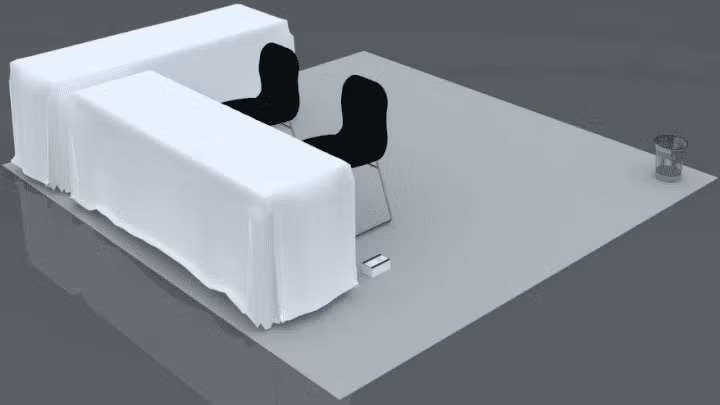
Diamond Sponsors receive:
- 3m x 3m space
- Two (2) 1.8m x .6m table with tablecloths set in an L-Shape
- Two (2) chairs
- One (1) power strip with multiple sockets
- One (1) wastebasket
- Existing ballroom carpet
- Shared conference wifi
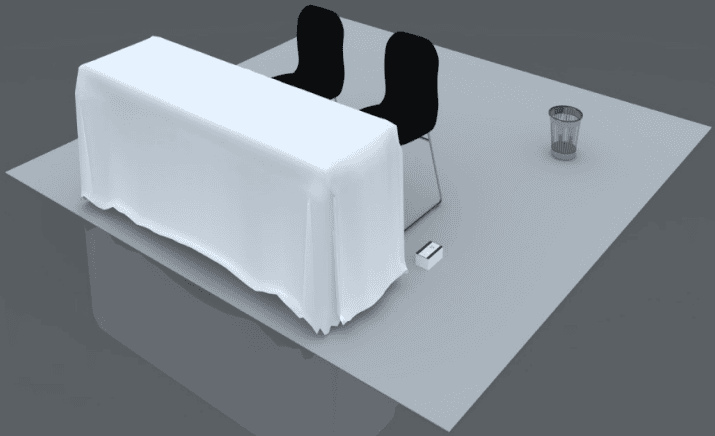
Platinum Sponsors receive:
- 3m x 3m space
- One (1) 1.8m x .6m table with tablecloth
- Two (2) chairs
- One (1) power strip with multiple sockets
- One (1) wastebasket
- Existing ballroom carpet
- Shared conference wifi
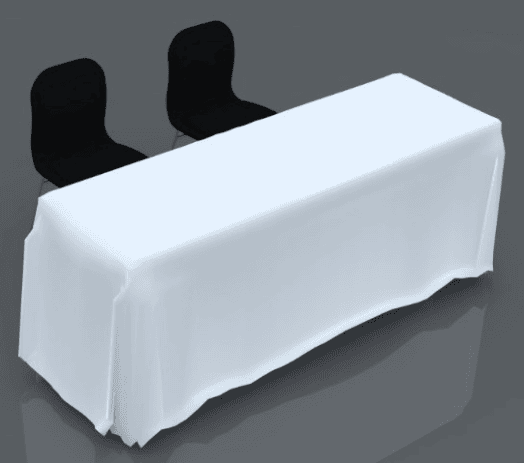
Gold, Silver, and Bronze Sponsors receive:
- One (1) 1.8m x .6m table with tablecloth
- Two (2) chairs
- One (1) power strip with multiple sockets
- One (1) wastebasket
- Existing ballroom carpet
- Shared conference wifi
Notes for all levels:
- Pop-up banners must fit within your space.
- You may bring your own branded tablecloth.
- Custom booths are not permitted.
- Don’t forget power adapters and converters!
All level sponsors may order additional power, hardline internet, and AV. See Additional Orders + Upgrades below for more details.
Additional Orders + Upgrades
ADDITIONAL Furniture, AV, Hard-Wired Internet and power
If you would like to rent additional furniture, AV (monitors), hardlines, or power for your tabletop, you will need to place your order no later than Monday, 1 June.
Fill out this order form and email it to the [email protected], [email protected], [email protected], and [email protected].
BOOTH UPGRADES
Custom booths are not permitted for this event. However, you may customize your tabletop space by purchasing counter and backwall upgrades. See below for booth upgrades allowed by sponsor level.
Diamond and Platinum Sponsors have the option to upgrade to:
- 3m (w) x 2.5m (h) backwall with front graphics
- 2M counter with front graphics
- 1M counter with front graphics
Gold, Silver, Bronze Sponsors have the option to upgrade to:
- 1M counter with front graphics
Fill out this order form and email it to the [email protected], [email protected], [email protected], and [email protected].
Graphic Specs
Refer to the graphic specs below when designing your graphics.
- 3M backwall: W 3000mm x H2439mm
- 2M counter front panel: W 2000mm x H 1000mm
- 1M counter front panel: W 1000mm x H 1000mm
Graphics must be submitted in JPEG format with CMYK color mode and 300DPI resolution. Please make sure that all artwork complies with The Linux Foundation branding guidelines and Trademark policy.
Shipping + Storage
Shipping Instructions
Each company is responsible for shipping and tracking their own exhibit materials to and from the conference. If you plan to ship items for your booth, please read the information carefully as proper documentation and payment may be required prior to making any shipping arrangements, especially if shipping internationally. The official logistics provider for this event is RE Roger.
International Shipments
BEFORE SHIPPING: You must reach out to Swapnil Tawde at [email protected] to arrange customs clearance services for your international shipment. Do NOT ship anything internationally without reaching out to Swapnil Tawde first to avoid any custom clearance complications. We recommend reaching out no later than Thursday, 21 May.
R.E. Rogers strongly recommends that all international exhibitors avoid using courier services (like DHL, FedEx, UPS) due to a higher risk of delays, customs holds, and issues with venue-required KYC documents.
International Receiving Dates
3 – 10 June
International Shipping Address (Warehouse)
R.E.ROGERS INDIA PVT LTD
510/511 MIDAS, SAHAR PLAZA COMPLEX,
ANDHERI EAST, MUMBAI 400059
Contacts –
Swapnil Tawde – [email protected]
+91 9821033809
Nanhe Mishra – [email protected]
+91 98197 98027
International Charges
EUR 100
(~INR 10760) + 18% Tax per shipment (not per box)
Payment Methods: Wire transfer is accepted for foreign currency and UPI + Cash for Indian currency.
Please remember to include your company name and event name to your shipments as well. You can find the Shipping Label format below.
For questions regarding your shipment, please reach out to Swapnil Tawde and copy Courtenay Pope and Kate Qiu.
Domestic Shipments
Do NOT ship to the below address if your shipment is coming from outside India. The information below is only for domestic shipments. The venue will not be able to provide proper documentation to receive international packages.
Domestic Receiving Dates
3 – 17 June
Domestic Shipping Address (Venue)
R. E. Rogers India Pvt. Ltd.
C/o Jio World Centre
Gate 23, Dock Office
G Block, Bandra Kurla Complex
Bandra East, Mumbai – 400098
Contact –
Pradeep
Mobile: +91 86552 72421
Shipments must be delivered strictly to the above address.
Shipments will not be collected from the gate.
Any parking charges imposed by the venue must be paid directly by the courier company.
Charges
INR 2,655 (~25 EUR) incl. GST per shipment (not per box)
Payment Methods: Wire transfer is accepted for foreign currency and UPI + Cash for Indian currency.
Please remember to include your company name and event name to your shipments as well. You can find the Shipping Label format below.
For questions regarding your shipment, please reach out to Swapnil Tawde and copy Courtenay Pope and Kate Qiu.
Shipping Labels
In addition to the destination addresses listed above, shipments must have the following information listed visibly on the package:
Show Details: Open Source Summit India, 16 – 17 June, JWCC, Lotus Ballroom 1
Sender Name + Contact Number:
Company/Exhibitor Name:
Booth Number:
Exhibitor Onsite Contact + Contact Number:
Package Number: __of __
Tracking Instructions
Along with completing proper documentation for RE Rogers, please submit all tracking numbers for your shipments via the form below so that the LF Sponsor team can ensure that your items are delivered to the conference venue. The more information you provide this will help our team and RE Rogers in any necessary tracking.
Shipping Tracking Form for Sponsor Team
For questions regarding your shipment, please reach out to Swapnil Tawde and copy Courtenay Pope and Kate Qiu.
Outbound Shipping Instruction + Information
We advise making both inbound and outbound shipping arrangements at once. Please reach out to RE Rogers, Swapnil Tawde at [email protected] to coordinate your outbound shipping.
Individuals are responsible for repacking, affixing labels.
ALL booth materials must be removed from the conference venue by 17 June at 8:00pm. Any shipment/courier pick ups will need to be prearranged for Solutions Showcase dismantling hours. Therefore, your booth materials need to be packed, labeled, and ready for shipping when you leave your booth.
Material Handling, Hand-Carrying + Private Vehicles
Sponsors may carry small, lightweight items into the venue by hand. Any materials that require the use of wheeled or mechanical equipment, such as dollies or flatbeds, must be delivered via the loading docks and are prohibited in the venue lobbies or hallways.
Onsite Security + Storage
Please do not leave valuable items unattended at your tabletop. There will be no onsite storage so we recommend taking valuables such as laptops to your hotel room. There will be general security and the sponsor showcase will be locked overnight. If needed, you may make storage arrangements with RE Rogers. Please note that this will be an additional fee at your expense.
Neither the Linux Foundation, RE Rogers, JWCC, Celebration, nor their employees, staff, or third-party vendors will be held liable for lost or stolen items.
Lead Retrieval
Each sponsorship levels includes lead retrieval for collecting attendee contact information at your booth. See below for lead retrieval provided based on sponsorship level:
- Diamond, Platinum, Gold, Silver: One (1) Lead Retrieval Device
- Bronze: Mobile App Only
Lead Retrieval Options
You may choose from the following for your Lead Retrieval Option. If no choice is submitted by the deadline, no physical lead retrieval device will be provided.
Option 1: Physical Lead Retrieval Device(s)
Select this option if you would like to receive the physical lead retrieval device that is included in your sponsorship. In addition to the provided physical device, you can rent additional devices.
Option 2: Mobile App Only
Select this option if you don’t want to receive the physical lead retrieval device that is included in your sponsorship and will use the app on your own personal devices only. You may log into multiple devices with the same license. Requires iOS 15.0 or later or Android 9.0 or later.
Option 3: No Lead Retrieval
Select this option if you do not want to collect leads onsite and won’t use the lead retrieval devices or app.
Please email Courtenay Pope and Kate Qiu your Lead Retrieval Option by Thursday, 21 May.
Additional Lead Retrieval Device Order
Additional lead devices may be purchased for USD 250. Please email Courtenay Pope and Kate Qiu by Thursday, 21 May if you would like to order an additional lead device.
The lead scanning app is a mobile app that can be used on a personal smartphone, so your team members are welcome to download the app (details in the instructions section below) at no additional cost. The lead scanning app supports multiple device log-ins.
Expo-Genie Lead Scanning is the official lead retrieval provider for this event.
Lead Retrieval Rules + Regulations
- Lead retrieval devices and apps may be used to scan attendee badges within your exhibit booth ONLY. Scanning attendee badges in aisles, lounges, or anywhere outside of the Solutions Showcase is NOT permitted. If lead retrieval devices or apps are used outside of a sponsor’s booth, CNCF reserves the right to delete the leads and exclude the sponsor from lead retrieval at future events.
- Lead retrieval at private offsite functions or sponsor-hosted events such as after-hour networking events, meet-ups, parties, etc. is strictly prohibited.
- All attendees must verbally consent prior to scanning their name badge.
- Physical lead retrieval devices may be picked up at the exhibitor services desk during setup and must be returned before the end of teardown.
- Handle your lead retrieval device(s) with care and do not leave any device(s) unattended at your booth. A replacement fee of up to $1500 USD will be assessed for any lost, damaged, or stolen device.
Lead Report Data
The following attendee information will be included in the lead report:
- First name
- Last name
- Job title
- Company name
- Email address
- Physical address incl. country, city, state, zip code/postal code
- Job Function
- Industry
- Custom qualifiers (if applicable)
No Phone Numbers
For privacy reasons, phone numbers will NOT be included in the lead reports. If you wish to record attendees’ phone numbers, feel free to ask them for this information and add it manually as a note for each lead or create a custom question for this purpose.
Lead Retrieval Portal + Scanning Instructions
Once you are logged in, you will be able to:
- Add your Staff, giving them their own log-in so they can scan leads at the event.
- Staff will only see the leads they’ve scanned.
- You may add as many Staff and download the app as many times as you require at no additional cost.
- Add custom qualifiers
- Export your lead reports. All leads will go to one lead report.
Please follow the steps below to set up your lead scanning, add booth staff, and scan leads.
Set Up your Lead Campaign for this Event
A lead campaign is a specific area of the event you are scanning leads for. You have (1) booth, so you will create (1) lead campaign.
- Use the login information provided in the initial ExpoGenie email to login into the Lead Retrieval platform.
- From the left menu, click Lead Campaigns. You will see a campaign for your event. Click Edit.
- First section is Event Selection.
- Confirm the event that you want to scan badges for is listed.
- Click Next.
- Second section is Lead Data Fields.
- Review the preset attendee data points that will be provided to you upon the scan, determined by the event organizer (See above for included fields).
- Click Next.
- Third section is the Lead Qualification Form.
- Here is where you can create custom qualifiers or use the ones provided for you. These are questions that you’d like your onsite team to answer after scanning the attendee’s badge, or interaction with an attendee at the booth.
- Make sure each question you want to ask is toggled to enabled! Make sure to click publish on the last page to confirm any updates you make.
- For privacy reasons, phone numbers will NOT be included in the leads reports. If you wish to record attendees’ phone numbers, feel free to ask them for this information and add that question here.
- “Notes” are automatically enabled by default here.
- Once done, click Next for any edits to be saved.
- Fourth section is Booth Staff.
- Add and assign booth staff who will be scanning leads at your booth.
- Supervisors can see ALL scans for the campaign. Booth Personnel can only see and download their own scans.
- If the Sponsor Admin will also be scanning onsite for leads, make sure you are added under booth staff with Supervisor access.
- If you are adding a new Booth Personnel contact, please make sure to toggle on the Welcome Email. They will also receive a notification email that they have been added to the event campaign.
- Click Save changes. Your team is now ready to scan leads!
Mobile App for Download
Please note you will need to use the lead scanning app on your own device and devices are not provided at this event. In addition, your booth staff may download the app to their own mobile devices and use it to scan attendee badges free of charge:
- Google Play: https://play.google.com/store/apps/details?id=com.e2esp.expogenie&pcampaignid=web_share
- Apple App Store: https://apps.apple.com/nz/app/expogenie-leads/id6469518790
Accessing Your Lead Report
As sponsor admin, you can view and export leads at any time during and after the event from the ExpoGenie Leads portal:
- Log into the ExpoGenie Leads Portal
- Click “Lead Reports” in the left side menu
- Find the campaign you want to download leads for and click “View Report”
- Select all of your leads by clicking the top checkbox under “Leads Data”
- Click “Actions” in the upper right corner and then “Export Selected”.
Event Guidelines
To ensure a safe and enjoyable event experience for all attendees, please adhere to the following rules and regulations. This list is not exhaustive.
Code of Conduct
The Linux Foundation is dedicated to providing a harassment-free experience for participants at all of our events. All participants are expected to behave in accordance with our Code of Conduct. Sponsors must not use sexualized images, videos, activities, giveaways, or other material, or otherwise create a sexualized environment.
The Linux Foundation reserves the right to remove anyone from the event if it is determined that their participation or behavior creates a disruption or hinders the event or the enjoyment of the event by other attendees.
Livestreaming + Rebroadcasting
It is prohibited to record, copy, reproduce, live stream, rebroadcast, or otherwise distribute recordings, live streams, or broadcasts of events hosted by the Linux Foundation without first obtaining the express written permission of the Linux Foundation.
Photography + Videography
Sponsors are welcome to take pictures and videos within their designated booth space, but not outside of the booth space. Please keep aisles clear of any equipment, ensuring they do not disturb neighboring booths or attendees. When taking pictures or videos of attendees inside the booth space, it is essential to get the approval of the participants first and to disclose the use of the photos or video to them. A photo or video release form for participants is recommended, especially if the footage will be used for commercial or promotional purposes. Sponsors are responsible for familiarizing themselves with and adhering to local regulations regarding professional photography and videography.
Email Courtenay Pope and Kate Qiu if you have planned any extensive photography or videography projects.
Sponsor-Hosted Events
Events organized by sponsor companies may not overlap and/or interfere with the official conference program. Sponsor-hosted events include, but are not limited to, meetings, gatherings, training or educational sessions, workshops, as well as social and evening events that are organized by or on behalf of sponsor companies and are open to Open Source Summit North America attendees, regardless of whether they require an admission fee or are free to attend.
If you are hosting an event, please adhere to the following regulations:
- DO NOT hold an event that overlaps or partially overlaps with the official program on the main conference days, Tuesday 16 June – Wednesday, 17 June. This includes social and evening events such as the Tuk Trek (onsite attendee reception). Please review the Solutions Showcase hours carefully and check back regularly as times may be subject to change. It is permitted to host events during the following dates and times (subject to change):
- Tuesday, 16 June after 8:30pm IST
- Wednesday, 17 June after 8:00pm IST
- DO NOT organize group transportation such as vans or busses to pick up attendees from the conference venue or the Linux Foundation-hosted offsite events.
- DO NOT scan attendee name badges with lead retrieval devices and apps at sponsor-hosted events. Lead scanning is only permitted by sponsors within their onsite booth.
- DO NOT use the Open Source Summit India conference name or logo to promote sponsor-hosted events on posters, brochures, signs, websites, social media, or other marketing materials.
- To ensure a safe and welcoming environment for all attendees, we ask sponsors to strictly follow and enforce the Linux Foundation Code of Conduct at their privately hosted events.
The Linux Foundation reserves the right to restrict a sponsor’s access to future sponsorship opportunities and benefits if their events violate any of the above regulations. If you are planning to host your own event(s), we strongly encourage you to share your plans for review early on to avoid any conflict. Please reach out to Courtenay Pope and Kate Qiu with any questions or concerns.
Sponsor Branding + Activities
All sponsor activities, branding, promotional items, and collateral must be confined within each sponsor’s booth space and are prohibited anywhere outside of the booth including other areas within the Solutions Showcase, the conference venue, all host hotels, offsite event venues, and any nearby public spaces within a one-kilometer radius of the event venue, all host hotels, and offsite event venues. Examples include business cards, flyers, or collateral left on tables or in seating areas, floor clings or markings, soliciting business outside of designated booth spaces, or promotional activities near the venue or host hotels.
Nothing may be taped, nailed, stapled, tacked, or otherwise affixed to any walls, ceilings, flooring, painted surfaces, fire sprinklers, columns, fabric, walls or podiums without prior authorization from the LF Sponsor Services team. This includes all surfaces throughout the JWCC building, not just in the exhibit halls, Celebration property, and on the Linux Foundation property (such as event signage). The Linux Foundation reserves the right to restrict and/or remove any sponsored activities, branding, promotional items, and collateral outside of designated booth spaces at the sponsor’s own expense. Any damages incurred will be expensed to the sponsor.
Food and Beverages
To accommodate attendees with severe nut allergies, we strive to create a nut-free environment at our event. We will not serve food or drinks containing nuts, and sponsors cannot provide giveaways that have nuts. We also ask that you refrain from providing giveaways that may contain nuts (e.g. popular chocolate bars and candy such as Snickers, Peanut M&Ms, Reese’s, etc. are prohibited).
Please note: the Linux Foundation reserves the right to request removal of any items containing nuts. If you have any questions or concerns, please email Courtenay Pope and Kate Qiu.
Suitcasing or Outboarding
“Suitcasing” is the practice of participating in an event as an attendee and using that attendee access to solicit business from other attendees, exhibitors, or event participants.
“Outboarding” is the practice of setting up events, activities, exhibitions, or a booth in the event venue or its vicinity (e.g., in a hotel room, lounge, or meeting space, or at a nearby business) without authorization.
In both cases, the effect is to take the benefits of being a sponsor or exhibitor without having paid the fees (which are necessary for LF, a nonprofit organization, to be able to create and host the event), and to undermine the structures of the event around sponsorship and exhibition. Any attendees suitcasing or outboarding may have their access to the event revoked and may be barred from participating in future events. If you see a party suitcasing or outboarding at the event, please report it to the LF events team at the information desk or sponsor services desk.
Drug Policy
Use of recreational drugs, including all DEA-scheduled drugs (without a prescription) and all cannabinoids, is not permitted at the event. Such drugs are also not permitted as part of any giveaway or promotion at the event.
Firearms
The Linux Foundation does not allow firearms, regardless of whether they are permitted or not, or whether they are concealed or not, to be brought into our events such as Open Source Summit North America.
Pets + Service Animals
There are no animal welfare facilities at the venue. To support animal welfare, no pets are permitted at the event except service animals. Service animals may only perform the tasks they are trained for. They may not be used for promotional activities.